```
███ ██ ██ ██ ██ ███ ███ ██████ ██████ ███ ██ ███████ ██ ██████
████ ██ ██ ██ ██ ████ ████ ██ ██ ██ ████ ██ ██ ██ ██
██ ██ ██ ██ ██ ██ ██ ████ ██ ██ ██ ██ ██ ██ ██ █████ ██ ██ ███
██ ██ ██ ██ ██ ██ ██ ██ ██ ██ ██ ██ ██ ██ ██ ██ ██ ██ ██
██ ████ ████ ██ ██ ██ ██████ ██████ ██ ████ ██ ██ ██████
```
# Introduction
This repo hosts my Nvim configuration for all the platforms I am using (Linux,
Windows and macOS). `init.vim` is the config entry point for terminal Nvim,
and `ginit.vim` is the additional config file for GUI client of Nvim (I am
using [neovim-qt](https://github.com/equalsraf/neovim-qt) for now on Windows).
My configurations are heavily documented to make it as clear as possible. While
you can download the whole repository and use it, it is not recommended though.
Good configurations are personal. Everyone should have his or her unique config
file. You are encouraged to copy from this repo the part you feel useful and
add it to your own Nvim config.
See [doc here](docs/README.md) on how to install Nvim's dependencies, Nvim
itself, and how to set up on different platforms (Linux, macOS and Windows).
**This config is tested against [Nvim v0.6.1 release](https://github.com/neovim/neovim/releases/tag/stable).
No backward compatibility is guaranteed.**
# Features #
+ Plugin management via [Packer.nvim](https://github.com/wbthomason/packer.nvim).
+ Code auto-completion via [nvim-cmp](https://github.com/hrsh7th/nvim-cmp) and [nvim-lspconfig](https://github.com/neovim/nvim-lspconfig).
+ Git integration via [vim-fugitive](https://github.com/tpope/vim-fugitive).
+ Better escaping from insert mode via [better-escape.vim](https://github.com/jdhao/better-escape.vim).
+ Ultra-fast project-wide fuzzy searching via [LeaderF](https://github.com/Yggdroot/LeaderF).
+ Faster code commenting via [vim-commentary](https://github.com/tpope/vim-commentary).
+ Faster matching pair insertion and jump via [delimitMate](https://github.com/Raimondi/delimitMate).
+ Smarter and faster matching pair management (add, replace or delete) via [vim-sandwich](https://github.com/machakann/vim-sandwich).
+ Fast buffer jump via [hop.nvim](https://github.com/phaazon/hop.nvim).
+ Ultra fast snippet insertion via [Ultisnips](https://github.com/SirVer/ultisnips).
+ Beautiful status line via [lualine.nvim](https://github.com/nvim-lualine/lualine.nvim).
+ Better quickfix list with [nvim-bqf](https://github.com/kevinhwang91/nvim-bqf).
+ Show search index and count with [nvim-hlslens](https://github.com/kevinhwang91/nvim-hlslens).
+ Command line auto-completion via [wilder.nvim](https://github.com/gelguy/wilder.nvim).
+ Keymap display via [which-key.nvim](https://github.com/folke/which-key.nvim).
+ Asynchronous code execution via [asyncrun.vim](https://github.com/skywind3000/asyncrun.vim).
+ Code highlighting via [nvim-treesitter](https://github.com/nvim-treesitter/nvim-treesitter).
+ Code editing using true nvim inside browser via [firenvim](https://github.com/glacambre/firenvim).
+ Color theme via [vim-gruvbox8](https://github.com/lifepillar/vim-gruvbox8) and other beautiful themes.
+ Markdown writing and previewing via [vim-markdown](https://github.com/plasticboy/vim-markdown) and [markdown-preview.nvim](https://github.com/iamcco/markdown-preview.nvim).
+ Animated GUI style notification via [nvim-notify](https://github.com/rcarriga/nvim-notify).
+ Smooth scroll experience via [neoscroll](https://github.com/karb94/neoscroll.nvim).
+ Tags navigation via [vista](https://github.com/liuchengxu/vista.vim).
+ Code formatting via [Neoformat](https://github.com/sbdchd/neoformat).
+ Undo management via [vim-mundo](https://github.com/simnalamburt/vim-mundo)
+ LaTeX editing via [vimtex](https://github.com/lervag/vimtex) [1](#f1).
+ ......
# UI Demo
For more UI demos, see [here](https://github.com/jdhao/nvim-config/issues/15).
## Start screen with alpha-nvim

## fuzzy finding using LeaderF

## Code autocompletion with nvim-cmp
## Git add, commit and push via fugitive.vim

## Command-line autocompletion with wilder.nvim

## Tags

## Cursor jump via hop.nvim
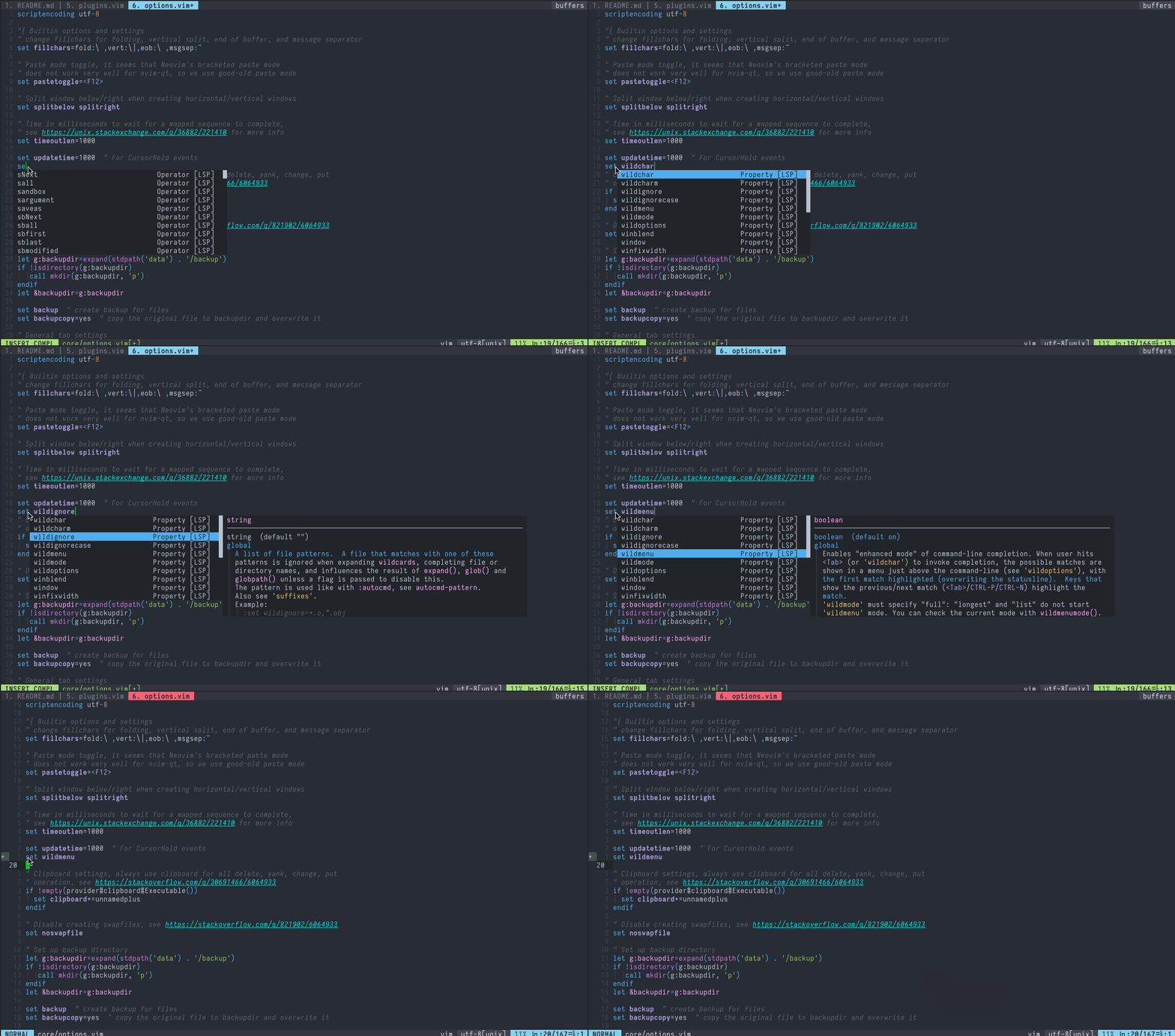
Go to a string starting with `se`

## GUI-style notification with nvim-notify

# Shortcuts
Some of the shortcuts I use frequently. In the following shortcuts, ``
represents ASCII character `,`.
| Shortcut | Mode | platform | Description |
|-------------------|---------------|-----------------|------------------------------------------------------------------|
| `ff` | Normal | Linux/macOS/Win | Fuzzy file searching in a floating window |
| `fh` | Normal | Linux/macOS/Win | Fuzzy help file grepping in a floating window |
| `fg` | Normal | Linux/macOS/Win | Fuzzy project-wide grepping in a floating window |
| `ft` | Normal | Linux/macOS/Win | Fuzzy buffer tag searching in a floating window |
| `fb` | Normal | Linux/macOS/Win | Fuzzy buffer switching in a floating window |
| `` | Normal | Linux/macOS/Win | Remove trailing white spaces |
| `v` | Normal | Linux/macOS/Win | Reselect last pasted text |
| `ev` | Normal | Linux/macOS/Win | Edit Nvim config in a new tabpage |
| `sv` | Normal | Linux/macOS/Win | Reload Nvim config |
| `st` | Normal | Linux/macOS/Win | Show highlight group for cursor text |
| `q` | Normal | Linux/macOS/Win | Quit current window |
| `Q` | Normal | Linux/macOS/Win | Quit all window and close Nvim |
| `w` | Normal | Linux/macOS/Win | Save current buffer content |
| `y` | Normal | Linux/macOS/Win | Copy the content of entire buffer to default register |
| `cl` | Normal | Linux/macOS/Win | Toggle cursor column |
| `cd` | Normal | Linux/macOS/Win | Change current working directory to to the dir of current buffer |
| `t` | Normal | Linux/macOS/Win | Toggle tag window (show project tags in the right window) |
| `gs` | Normal | Linux/macOS/Win | Show Git status result |
| `gw` | Normal | Linux/macOS/Win | Run Git add for current file |
| `gd` | Normal | Linux/macOS/Win | Run git diff for current file |
| `gc` | Normal | Linux/macOS/Win | Run git commit |
| `gpl` | Normal | Linux/macOS/Win | Run git pull |
| `gpu` | Normal | Linux/macOS/Win | Run git push |
| `` | Normal | Linux/macOS/Win | Run current source file (for Python, C++) |
| `` | Normal | Linux/macOS/Win | Toggle spell checking |
| `` | Normal | Linux/macOS/Win | Toggle paste mode |
| `\x` | Normal | Linux/macOS/Win | Close location or quickfix window |
| `\d` | Normal | Linux/macOS/Win | Close current buffer and go to previous buffer |
| `{count}gb` | Normal | Linux/macOS/Win | Go to buffer {count} or next buffer in the buffer list. |
| `Alt-m` | Normal | macOS/Win | Markdown previewing in system browser |
| `Alt-Shift-m` | Normal | macOS/Win | Stopping Markdown previewing in system browser |
| `ob` | Normal/Visual | macOS/Win | Open link under cursor or search visual selection |
| `ctrl-u` | Insert | Linux/macOS/Win | Turn word under cursor to upper case |
| `ctrl-t` | Insert | Linux/macOS/Win | Turn word under cursor to title case |
| `jk` | Insert | Linux/macOS/Win | Return to Normal mode without lagging |
# Custom commands
In addition to commands provided by various plugins, I have also created
several custom commands for personal use.
| command | description | example |
|------------|-------------------------------------------------------------------------|--------------------------------|
| `Redir` | capture command output to a tabpage for easier inspection. | `Redir hi` |
| `Edit` | edit multiple files at the same time, supports globing | `Edit *.vim` |
| `Datetime` | print current date and time or convert Unix time stamp to date and time | `Datetime 12345` or `Datetime` |
# Contributing
If you find anyting that can be improved, do not hesitate to point it out or create a PR.
If you come across an issue, you can first use `:checkhealth` command provided
by `nvim` to trouble-shoot yourself. Please read carefully the messages
provided by health check.
If you still have an issue, [open a new issue](https://github.com/jdhao/nvim-config/issues).
# Further readings
Some of the resources that I find helpful in mastering Nvim is documented [here](docs/nvim_resources.md).
You may also be interested in my posts on configuring Nvim:
+ My nvim notes can be found [here](https://jdhao.github.io/categories/Nvim/)
+ [Config nvim on Linux for Python development](https://jdhao.github.io/2018/12/24/centos_nvim_install_use_guide_en/)
+ [Nvim config on Windows 10](https://jdhao.github.io/2018/11/15/neovim_configuration_windows/)
+ [Nvim-qt config on Windows 10](https://jdhao.github.io/2019/01/17/nvim_qt_settings_on_windows/)
+ [Using Neovim for Three years](https://jdhao.github.io/2021/12/31/using_nvim_after_three_years/)
1: Not enabled by default for Linux, see [this issue](https://github.com/jdhao/nvim-config/issues/4) on how to enable vimtex on Linux. [↩](#a1)




